---
title: Zeplyn + eMoney Integration
description: If your firm would benefit from a Zeplyn + eMoney integration, you can show your interest by submitting or supporting the request in your eMoney portal.
---
[Skip to content](https://kb.zeplyn.ai/en-us/zeplyn-help-center/zeplyn-emoney-integration#main-content)
English - United States
Show submenu for translations
.png?width=225&height=75&name=Zeplyn_Blue%20%26%20White%20(1).png)
Open main navigation
Close main navigation
- English - United States
Show submenu for translations
How can we help you?
- There are no suggestions because the search field is empty.
1. [Zeplyn Help Center](https://kb.zeplyn.ai/en-us/zeplyn-help-center?hsLang=en-us)
2. [Integrations](https://kb.zeplyn.ai/en-us/zeplyn-help-center/integrations?hsLang=en-us)
# Zeplyn + eMoney Integration
## If your firm would benefit from a Zeplyn + eMoney integration, you can show your interest by submitting or supporting the request in your eMoney portal.
#### How to request or support the integration
1. Log in to your **eMoney** portal.
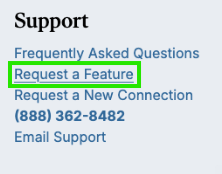
2. Scroll to the bottom of the page and find the **Support** section.
3. Click **Request a Feature**
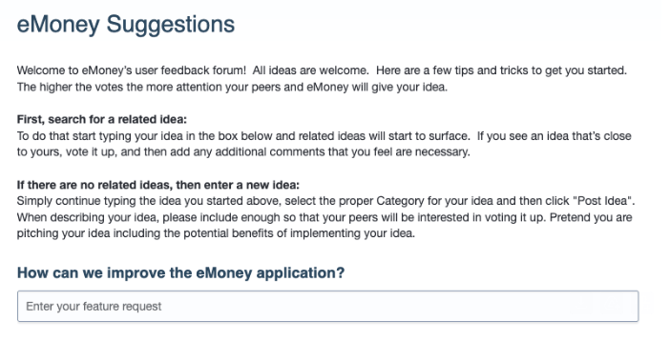
4. On the **eMoney Suggestions** page, type **Zeplyn** into the **'How can we improve the eMoney application?'** field.
5. If an existing Zeplyn request appears, open it and click **Vote**.
You may see the request listed as **Zeplyn AI Integration** or **Zeplyn.ai Integration**.
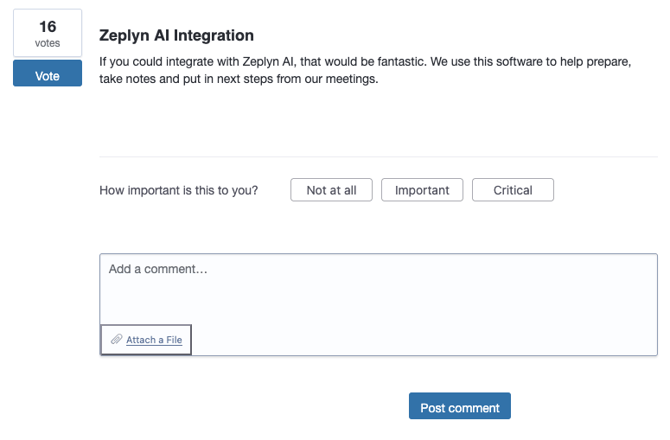
6. Select how important the integration is to your firm, such as **Important** or **Critical**.
7. Optional: Add a short comment explaining why the integration would be helpful.
*Example: Zeplyn helps our team prepare for meetings, capture notes, and organize next steps. An eMoney integration would reduce duplicate work and help keep our planning workflows more connected.*
8. Click **Post comment**.
*\*Please note: eMoney tracks interest by individual user, not just by firm, so each person on your team who uses eMoney should submit their own vote if this integration would be valuable to them.*
#### If there is not already a Zeplyn request:
If you do not see an existing Zeplyn request, you can submit a new one.
Use this title: **Zeplyn.ai Integration**
**Suggested description**: We would like to see an integration between Zeplyn and eMoney. Zeplyn helps our team prepare for meetings, capture meeting notes, and organize next steps. An integration would help reduce duplicate work and keep our planning workflows connected.
*\*For Enterprises if you are on an API plan we already have this integration set up and would love to get this set up for you! Please reach out to your dedicated CSM to configure.*
*For additional questions, please reach out to [support@zeplyn.ai](mailto:support@zeplyn.ai).*
- [Getting started](https://kb.zeplyn.ai/en-us/zeplyn-help-center/getting-started?hsLang=en-us)
- [Integrations](https://kb.zeplyn.ai/en-us/zeplyn-help-center/integrations?hsLang=en-us)
- [FAQs](https://kb.zeplyn.ai/en-us/zeplyn-help-center/faqs?hsLang=en-us)
- [Zeplyn Agent Nexus](https://kb.zeplyn.ai/en-us/zeplyn-help-center/zeplyn-agent-nexus?hsLang=en-us)
[mailto:email@email.com](mailto:email@email.com)
Copyright © 2026, Zeplyn