---
title: Organization Admin Permissions
description: Organization Admins have elevated access in Zeplyn to manage firm-wide settings, users, and collaboration controls. This article outlines what Org Admins can see and control.
---
[Skip to content](https://kb.zeplyn.ai/en-us/zeplyn-help-center/organization-admin-permissions#main-content)
English - United States
Show submenu for translations
.png?width=225&height=75&name=Zeplyn_Blue%20%26%20White%20(1).png)
Open main navigation
Close main navigation
- English - United States
Show submenu for translations
How can we help you?
- There are no suggestions because the search field is empty.
1. [Zeplyn Help Center](https://kb.zeplyn.ai/en-us/zeplyn-help-center?hsLang=en-us)
2. [FAQs](https://kb.zeplyn.ai/en-us/zeplyn-help-center/faqs?hsLang=en-us)
# Organization Admin Permissions
## Organization Admins have elevated access in Zeplyn to manage firm-wide settings, users, and collaboration controls. This article outlines what Org Admins can see and control.
### Where Org Admin Permissions Live
From the left navigation menu, click **Admin**.
This opens the admin panel, which is organized into two sections:
- **Admin** — Users, Workgroups, User Impersonation, and Agents
- **Organization Preferences** — firm-wide settings
****
These sections are only visible to Org Admins.
### Organization Preferences (Firm-Wide Settings)
The first four settings under **Organization Preferences** mirror the same options found under individual **Preferences**, but when configured here, they apply across the entire organization:
- **General**
- **Email Configuration**
- **Notifications**
- **Calendar Preferences**
****
### Notetaker
- Customize notetaker appearance (image and name)
- Control whether background images are shown
- Enable or disable the audio disclaimer for meetings
- Set the notetaker to join meetings early if this is preferred for your firm

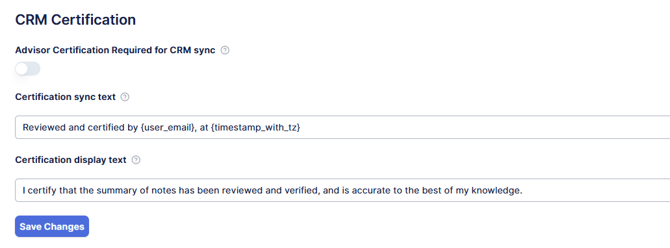
### CRM Certification
- Require advisors to certify notes before syncing to CRM
- Customize certification text displayed to users
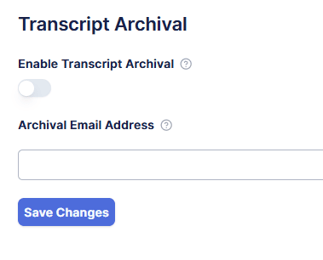
### Transcript Archival
- Toggle to enable, then set email for automatic transcript archival
### Custom Syncing Preferences - Action Items
You can now decide—for your whole firm—whether action items sync to your CRM. This lets you set one consistent rule for everyone, or leave the choice up to each advisor.
To set it up:
1. From the left navigation menu, click **Admin**
2. Under **Organization Preferences**, select **Sync Item**
3. Choose how action items should sync under **Action Items Sync Mode**
You have four options:
- **Always Disabled** — Action items never sync to the CRM, and advisors can’t turn syncing on.
- **Always Enabled** — Action items always sync to the CRM, and advisors can’t turn syncing off.
- **User choice (default: off)** — Each advisor decides whether to sync. Syncing starts off until they turn it on.
- **User choice (default: on)** — Each advisor decides whether to sync. Syncing starts on until they turn it off.
Whatever you choose here shapes what advisors see in their own settings. For example, if you select **Always Disabled**, the **Sync to CRM** toggle for action items will appear switched off and advisors won’t be able to turn it on.
*Note: Action Items Sync Mode is the only Sync Item setting available right now. More are on the way.*
### Users (aka User Management)
- Add new users
- Edit existing users
- Deactivate users
- Assign **Organization Admin** permissions via Entitlements
*[More on User Management](https://kb.zeplyn.ai/en-us/zeplyn-help-center/user-management?hsLang=en-us)*
### Workgroups
- Create and manage Workgroups
- Control how notes and client data are shared across teams
[Workgroups in Zeplyn](https://kb.zeplyn.ai/en-us/zeplyn-help-center/workgroups-teams-in-zeplyn?hsLang=en-us)
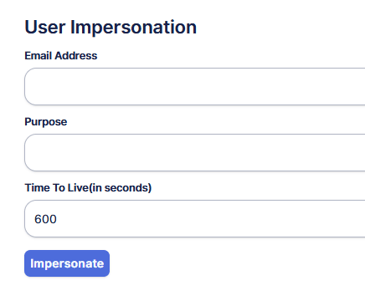
### User Impersonation
- Temporarily access another user’s account for troubleshooting or support
- Set a time limit for impersonation sessions
- Allows entering a purpose for audit tracking
### Agents
*Coming soon to all!* Agents will let your firm create your own AI agents to run within Zeplyn.
### Key Things to Know
- Organization-level settings help enforce consistency across the firm
- There is no limit to how many Org Admins a firm can have
*To become the organization admin for your firm or for additional questions, please reach out to [support@zeplyn.ai](mailto:support@zeplyn.ai).*
- [Getting started](https://kb.zeplyn.ai/en-us/zeplyn-help-center/getting-started?hsLang=en-us)
- [Integrations](https://kb.zeplyn.ai/en-us/zeplyn-help-center/integrations?hsLang=en-us)
- [FAQs](https://kb.zeplyn.ai/en-us/zeplyn-help-center/faqs?hsLang=en-us)
- [Zeplyn Agent Nexus](https://kb.zeplyn.ai/en-us/zeplyn-help-center/zeplyn-agent-nexus?hsLang=en-us)
[mailto:email@email.com](mailto:email@email.com)
Copyright © 2026, Zeplyn