.png?width=225&height=75&name=Zeplyn_Blue%20%26%20White%20(1).png)
Standard Meeting Types
-
Client Meeting – Used for meetings with clients or prospects. The summary focuses on client discussions, action items, and follow-ups.
-
Internal Meeting – Used for team meetings within your company. The summary highlights internal discussions, strategies, and tasks.
-
Debrief – Used when the notetaker was not activated during a meeting or when a client requests that a notetaker not be used. This meeting type provides a highly detailed summary, capturing as much information as possible based on manually entered notes. It ensures that key details, discussion points, and action items are thoroughly documented.
Additional Meeting Types
-
Discovery Meeting – Used for early-stage meetings with prospective clients to gather information and understand their goals, needs, and current situation. The summary is designed to support follow-up conversations and next steps.
-
Annual Review – Designed for yearly check-ins with existing clients. The agenda and summary focus on performance reviews, goal progress, and planning for the year ahead.
-
Onboarding Meeting – Used for meetings with new clients. This meeting type structures notes around collecting key client data and information required to begin working with them effectively.

Changing Your Meeting Type
You can update your meeting type at any time, either before the meeting starts or while the meeting is in progress.
Reprocessing a Meeting With a Different Meeting Type
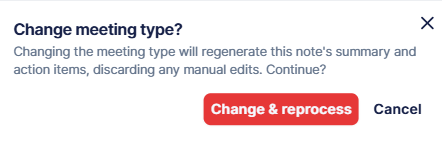
You can now reprocess a client meeting at any time — even after the meeting has ended and notes have already been generated. If you selected the wrong meeting type, or simply want the notes structured differently, change the meeting type and reprocess. Zeplyn will regenerate the notes and summary using the structure of the newly selected meeting type. Your original transcript is unchanged, so you can reprocess as many times as needed to get the format that works best for you.
What Is a Default Meeting Type?
Your default meeting type is the meeting type Zeplyn automatically applies to every new meeting, so you don't have to select one each time. Set it to the type you use most often. You can always override it for an individual meeting before it starts, while it's in progress, or by reprocessing afterward (see above).
To Change the Default Meeting Type:
-
Go to the User Menu (bottom left corner).
-
Select Settings.
-
Navigate to Preferences → General.
-
Choose your preferred default meeting type.

Note: Meeting types are customizable per organization. Your firm may have a different list of meeting types than what is shown in the examples above. If you have questions about your organization's specific meeting types, please contact your administrator.
For additional questions, please reach out to support@zeplyn.ai.