---
title: Automatic Client Matching
description: Zeplyn automatically associates existing meeting notes to a client profile once that client is created, helping you keep all interactions organized without manual work. This process uses email matching to find and link past meeting attendees to the correct client.
---
[Skip to content](https://kb.zeplyn.ai/en-us/zeplyn-help-center/automatic-client-matching-#main-content)
English - United States
Show submenu for translations
.png?width=225&height=75&name=Zeplyn_Blue%20%26%20White%20(1).png)
Open main navigation
Close main navigation
- English - United States
Show submenu for translations
How can we help you?
- There are no suggestions because the search field is empty.
1. [Zeplyn Help Center](https://kb.zeplyn.ai/en-us/zeplyn-help-center?hsLang=en-us)
2. [FAQs](https://kb.zeplyn.ai/en-us/zeplyn-help-center/faqs?hsLang=en-us)
# Automatic Client Matching
## Zeplyn automatically associates existing meeting notes to a client profile once that client is created, helping you keep all interactions organized without manual work. This process uses email matching to find and link past meeting attendees to the correct client.
### How It Works
When you create a client profile with an email address, Zeplyn will:
- Search past meeting notes for attendees with that same email
- Identify potential matches
- Prompt you to **link those attendees to the client**
Once confirmed, those notes are automatically associated with the client profile.
### Where You’ll See This
### 1. Matching Prompt
At the top of the client profile, you may see a message like: *“We have identified matching attendees for this client. Do you want to link them?”*
Click **Yes, link attendees** to complete the association.
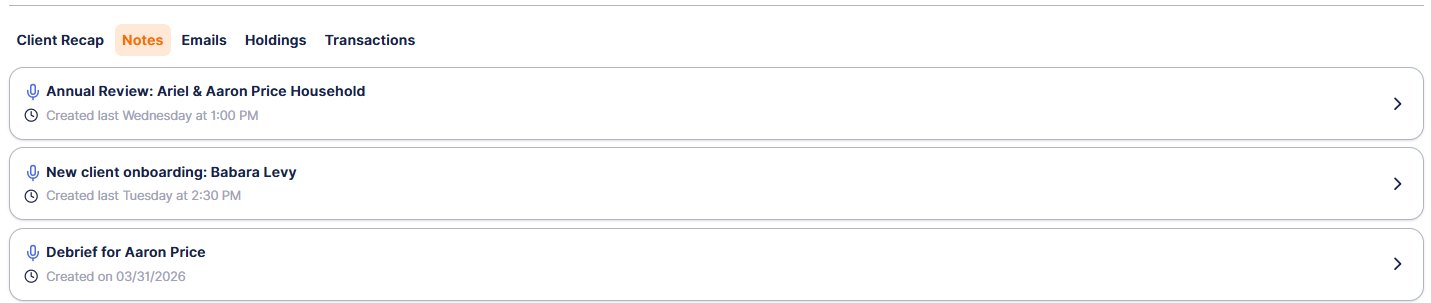
### 2. Client Profile → Notes Tab
After linking:
- All matched meeting notes will appear under the **Notes** tab
- These notes are now fully associated with the client
### What Gets Linked
- Meeting notes where the attendee email matches the client email
- Past notes created before the client profile existed
### Why This Matters
This feature helps you:
- Avoid manually reassigning notes
- Keep a complete history of client interactions
- Ensure accurate **Client Recaps** and reporting
### Best Practices
- Always include an accurate **email address** when creating clients
- Review and confirm suggested matches when prompted
*For additional questions, please reach out to [support@zeplyn.ai](mailto:support@zeplyn.ai).*
- [Getting started](https://kb.zeplyn.ai/en-us/zeplyn-help-center/getting-started?hsLang=en-us)
- [Integrations](https://kb.zeplyn.ai/en-us/zeplyn-help-center/integrations?hsLang=en-us)
- [FAQs](https://kb.zeplyn.ai/en-us/zeplyn-help-center/faqs?hsLang=en-us)
- [Zeplyn Agent Nexus](https://kb.zeplyn.ai/en-us/zeplyn-help-center/zeplyn-agent-nexus?hsLang=en-us)
[mailto:email@email.com](mailto:email@email.com)
Copyright © 2026, Zeplyn